Browse documentation
Match levels
Settings > Administration > Auto-match. Match levels are the result of our matching engine. Every possible pair of one bank line and one invoice gets one level. The level decides what happens next.
| Level | In short | Result |
|---|---|---|
| Certain | The bank line cites the invoice | Confirmed |
| Strong | Exact amount from the right payer | Confirmed if it is the only Strong invoice for that line |
| Possible | Worth a look, not proof | Waits in the Match inbox |
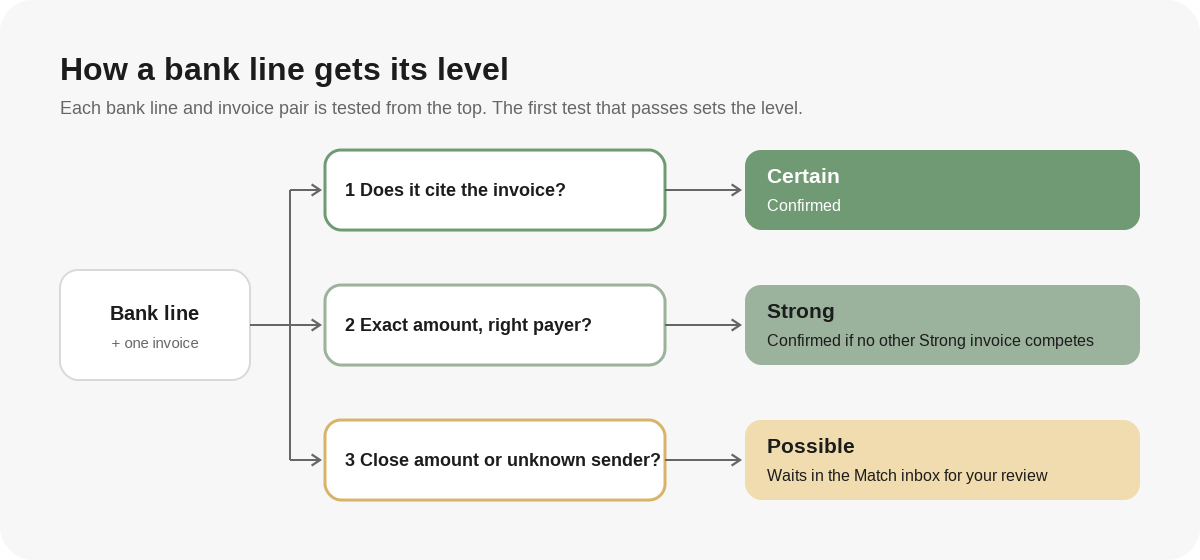
Every Entity uses the same three levels. You change the settings below, and the levels follow. The date never decides a level. It only puts the most likely invoice first.
A payment the levels cannot settle can go one step further: see Auto-match.
What each level means
Certain
The bank line cites the invoice number or the invoice external reference, and it pays within 15% of the amount due. A payment that is exactly the next open installment, or exactly the share expected from that payer, is Certain too. See Invoice reference for how Invunion reads the bank line.
Strong
The amount is exactly the Amount due of the invoice, or the next open installment, and it comes from the right payer. See Who is the right payer.
A Strong pair is confirmed when no other invoice competes: it is the only Strong invoice for that bank line, and no Certain invoice exists for the line. Otherwise it waits in the Match inbox.
Three other cases are Strong:
- A payer’s exact share. A third-party payer set to pay 70% of each invoice sends exactly 70%. See Third-party payers.
- A cited invoice paid by someone else. The bank line cites the invoice but comes from another customer, while Accept a payment from someone else if it names the invoice is on.
- Payments that add up. Two to six payments of the customer add up, to the cent, to what is left on one of its invoices, and nothing else fits. Invunion confirms them together.
Possible
The pair is worth a look, but it proves little. It waits in the Match inbox for you. A pair is Possible when:
- the right payer sends an amount within 15% of the amount due;
- the payment comes from the customer of the invoice, the payer named on it, or a related counterparty, whatever the amount, such as a deposit with no reference;
- the sender is unknown, and the amount is exact;
- the sender is unknown, the bank text names the customer, such as POUR COMPTE KAPPA RETAIL, and the payment is not more than the amount due;
- the payment comes from a new bank account, and the name the bank gives is exactly the name of the customer;
- the bank line cites the invoice, but the payment is more than 15% above or below the amount due;
- the bank line cites the invoice from another customer, while Accept a payment from someone else if it names the invoice is off.
Any other pair is not proposed.
Who is the right payer
Invunion reads the sender of the bank line from its counterparty, or from the owner of its payment method when the line has no counterparty yet. Then it compares the sender with the invoice:
| Sender | Result |
|---|---|
| The customer of the invoice | Right payer. A customer can always settle its own invoice. |
| The Payer (if not the customer) named on the invoice | Right payer. |
| A counterparty related to the customer: a company of its group, or its third-party payer | Right payer, when the relation is valid on the invoice date. See Counterparty relations. |
| A related counterparty set to Always review its payments | Right payer, but its pairs are Possible at most. |
| A counterparty with the Third-party payer role and no relation to the customer | Unknown. The role alone does not say whose invoices it pays. |
| Any other counterparty | Wrong payer. An exact amount is not proposed. |
| No counterparty, or Unclassified | Unknown. An exact amount is Possible. |
To tell Invunion who pays for a customer, see Third-party payers.
What you can set
On the Match levels card:
| Setting | What it does |
|---|---|
| Do your invoices often have the same amount? | Tells Invunion how much an exact amount proves. See Amounts that repeat. Default: Sometimes. |
| Handle Strong matches on its own | On: a Strong pair is confirmed when no other invoice competes. Off: Strong pairs wait in the Match inbox, and Auto-match confirms nothing. Default: on. |
| Accept a payment from someone else if it names the invoice | The bank line names the invoice but comes from a different customer, such as a parent company or an accountant. On: Strong. Off: Possible. Default: on. |
| Accept any amount from a customer with only one open invoice | See A customer with only one open invoice. Default: off. |
| Invoice reference | Which bank fields to read and which invoice fields to compare with. See Invoice reference. Default: all of them. |
The three switches are under What Invunion may do on its own. Each change is saved as soon as you make it.
Amounts that repeat
An exact amount proves less when many invoices share it. Choose the answer that fits how you price:
| Answer | When to choose it | What happens to an exact amount |
|---|---|---|
| Rarely | Almost every invoice has its own amount. | It counts fully. |
| Sometimes | Some amounts repeat. | It counts fully when no other open invoice of your Entity has the same open amount. Otherwise it counts one level lower. One exception: when the invoices that share the amount all belong to the right payer, the one due first counts fully. |
| Yes, often | Many invoices share the same amount, such as subscriptions. | It counts one level lower: Possible from the right payer, and not proposed from an unknown sender. |
A star marks the answer Invunion suggests from your invoices of the last 12 months. It suggests Yes, often when 60% or more of them share an amount, Rarely when 25% or less do, and Sometimes otherwise. With fewer than 20 invoices, it suggests nothing.
A citation of the invoice (Certain) is never affected by this setting.
A customer with only one open invoice
Some customers pay a part of an invoice with no reference: a deposit, an installment, a third. With Accept any amount from a customer with only one open invoice on, such a payment is Strong when all of this is true:
- the payment comes from the customer of the invoice itself, not from a payer or a related counterparty;
- the customer has no other open invoice and no open credit note;
- the bank text names no other invoice or credit note;
- the payment is not more than what is left on the invoice.
A refund works the same way: money you send to a customer on its only open credit note, when the customer has no open supplier invoice either.
A larger amount stays Possible: a person decides, or Auto-match.
Invoice reference
A bank line that cites the invoice is Certain. Choose where Invunion looks:
| Setting | Options |
|---|---|
| Read from | Structured reference, External reference, Remittance, Description |
| Compare with | Invoice number, Invoice external reference |
A hit on any ticked bank field for any ticked invoice field is enough. At least one of each stays ticked.
Invunion ignores spaces, hyphens, slashes, dots and plus signs, and capital letters. FAC-2026-001, FAC 2026 001 and fac.2026.001 are the same reference. Inside a longer text, the reference must appear as a whole word, with its full length. Invunion ignores references shorter than 4 characters, and purely numeric ones shorter than 5, because they look like dates and amounts.
| Bank line text | Invoice number | Cited? |
|---|---|---|
| Description Paiement client - Alpha Industries FAC-2026-002 | FAC-2026-002 | Yes |
| Remittance VIR FAC 2026 002 ALPHA | FAC-2026-002 | Yes |
| Description Paiement FAC-2026-10 | FAC-2026-1 | No: a digit follows |
| Description Paiement 2026-002 | FAC-2026-002 | No: only a fragment |
| Description Facture 12 payée | 12 | No: too short |
Customers often write the number their own way, such as Fact 2026/22 for FAC-2026-022. From the right payer, Invunion reads it as a citation when the numbers of the reference follow each other in the bank text, after a word that starts like the reference. From an unknown sender or a wrong payer, it is not a citation.
Example: one invoice, six bank lines
Invoice FAC-2026-019 of Kappa Retail is for 480,00 €, and Kappa Retail is its right payer. The first answer is Sometimes, and no other open invoice has the same amount.
| Bank line | Level | What happens |
|---|---|---|
| 480,00 € from Kappa Retail | Strong | Confirmed. |
| 480,00 € from Kappa Retail, with FAC-2026-019 in the description | Certain | Confirmed. |
| 450,00 € from Kappa Retail | Possible | Waits in the Match inbox. |
| 200,00 € from Kappa Retail, with FAC-2026-019 in the description | Possible | Waits in the Match inbox: the payment is more than 15% below the amount due. |
| 480,00 € from a sender Invunion cannot identify | Possible | Waits in the Match inbox, with the badge Sender not identified. |
| 480,00 € from another customer, no citation | Not proposed | The sender is a wrong payer. |
What changes after you change a setting
- Next matching run and Match inbox: the new settings apply to the next matching run. A suggestion still waiting in the Match inbox is read again with the new settings: it can be confirmed, or its level and reasons can change.
- Matches already made: Invunion never rewrites a confirmed match.
- The Match inbox: each suggestion shows its level and the reasons, such as Exact amount, Paid by the customer or Amount shared with other invoices. See Dashboard metrics.
- The Matching page: every match Invunion made or suggested is listed with its level. See Matching page.
Limits to keep in mind
- The 15% band is fixed. It is not a setting.
- A bank line is confirmed against one invoice at most. If it cites several invoices, all of them wait in the Match inbox.
- The match levels do not split one payment across several invoices. Auto-match can suggest the invoices together.
- A pair you marked Not a match is not suggested again.
Updated · View as Markdown