Review match confidence
Matching automatically confirms scores of 80 or more, sends scores from 50 through 79 for review, and ignores scores below 50. The score combines compatible direction and currency with amount, date, references, description, and counterparty signals. Treat it as decision support, not proof of payment ownership.
Browse documentation
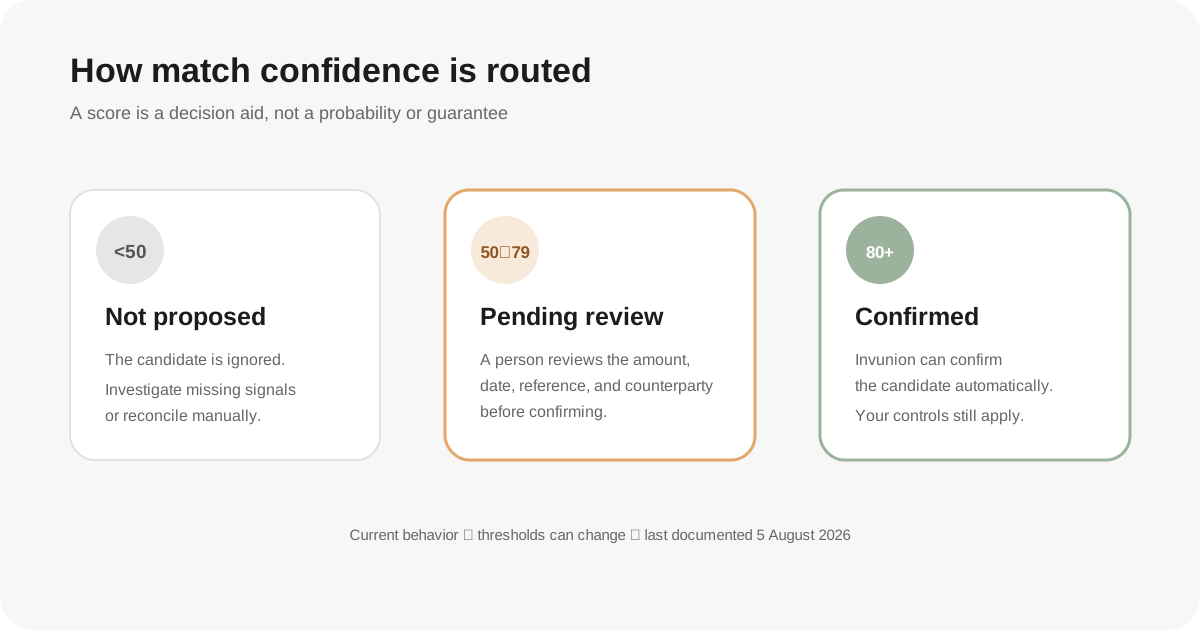
Match confidence summarizes how strongly a bank transaction resembles a compatible issued document. It helps prioritize review; it is not a bank confirmation, legal conclusion, or substitute for your accounting controls.
The thresholds below are verified current behavior and may change as the product develops:
- 80–100: high confidence; the match is automatically confirmed.
- 50–79: medium confidence; the match requires review.
- Below 50: low confidence; the candidate is ignored.
Invunion v1 applies reconciliation to incoming payments for issued invoices and outgoing refunds for issued credit notes. Payables and automatic many-to-many matching are not promised.
Prerequisites
- A synchronized or imported transaction.
- An open issued invoice or issued credit note in the same tenant.
- Permission to inspect or manage reconciliation.
- Access to source records needed to validate the payer, reference, amount, date, and currency.
Steps
-
Start with scope and direction. Confirm that the pair belongs to v1. Incoming cash can settle an issued invoice. Outgoing cash can settle an issued credit note when it represents the refund. An ordinary outgoing supplier payment is not a supported issued-invoice match.
-
Confirm the currency. The matcher prefilters candidates to the same currency. If the transaction and document currencies differ, do not reinterpret the score or manually convert one amount. No ECB foreign-exchange behavior is claimed.
-
Compare amounts. Exact amounts contribute stronger evidence. Approximate amounts can remain candidates within the matcher’s current tolerance, which supports partial or imperfect cases but also increases ambiguity. Compare with the invoice’s open amount and transaction’s remaining amount.
-
Compare dates. The matcher considers proximity to invoice and due dates. A same-day or nearby payment can score better, but recurring invoices and repeated totals can make date proximity misleading.
-
Inspect exact references. An exact invoice number, external reference, or structured bank reference is among the strongest signals. Verify the complete value, not only a shared prefix or short numeric fragment.
-
Read the original bank description. Look for the invoice number, customer name, or remittance text. Display descriptions may be enriched for readability, so use the underlying payment evidence available to you.
-
Verify the counterparty path. Invunion may associate a transaction through an exact bank identifier, normalized name, or payment method. Confirm that the association represents the same customer. Aggregators and shared payment platforms can make a counterparty name less decisive.
-
Apply the confidence-band action. Review a 50–79 candidate before confirmation. For an 80+ automatic confirmation, perform the level of post-check required by your controls. For a below-50 pair, investigate manually rather than assuming no relationship can exist.
-
Verify allocation after action. Check that the matched amount does not exceed either available balance and that open and remaining amounts changed as expected.
Expected result
You can explain why the candidate received its treatment and can point to independent evidence for the final decision. High confidence typically combines several aligned signals; medium confidence usually needs human resolution of missing or ambiguous evidence; low confidence does not appear as an actionable automatic candidate.
The exact score is less important than whether direction, document type, currency, amount, references, dates, and customer identity tell a consistent story.
Edge cases and troubleshooting
- Exact amount but medium confidence: references, counterparty, or dates may be weak. Exact amount alone is not enough when many invoices share a total.
- Strong reference but no candidate: verify direction, currency, open status, and date/amount prefiltering. Also confirm that the transaction is not ignored.
- An automatic confirmation looks wrong: do not preserve it merely because the score is high. Use available unlink or correction controls and document the reason.
- A platform payout covers multiple customers: shared aggregator identity can reduce the value of a counterparty signal. Verify the platform reference and allocation records.
- One transfer covers multiple invoices: the current deterministic matcher generates pair candidates; automatic N:N batch discovery is not promised. Use controlled manual allocation where supported.
- An outgoing transaction is excluded: this is expected for most outgoing movements. Only issued-credit-note refunds are in the v1 outgoing scope.
Security and sandbox notes
Confidence data can expose invoice numbers, customer names, amounts, and payment descriptions. Share screenshots or exports only through approved support and finance channels, and redact unrelated personal or banking data.
Sandbox scores are based on synthetic data. They demonstrate mechanics, not real-world accuracy. UI, score weighting, and thresholds can change, so use the updatedAt and reviewBy dates on this article when relying on it for procedures.
Next step
For a candidate you have verified, follow Complete your first reconciliation. If no valid candidate is available, use Resolve an unmatched transaction.
Updated
Was this article helpful?
Feedback helps us improve the next version of this guide.